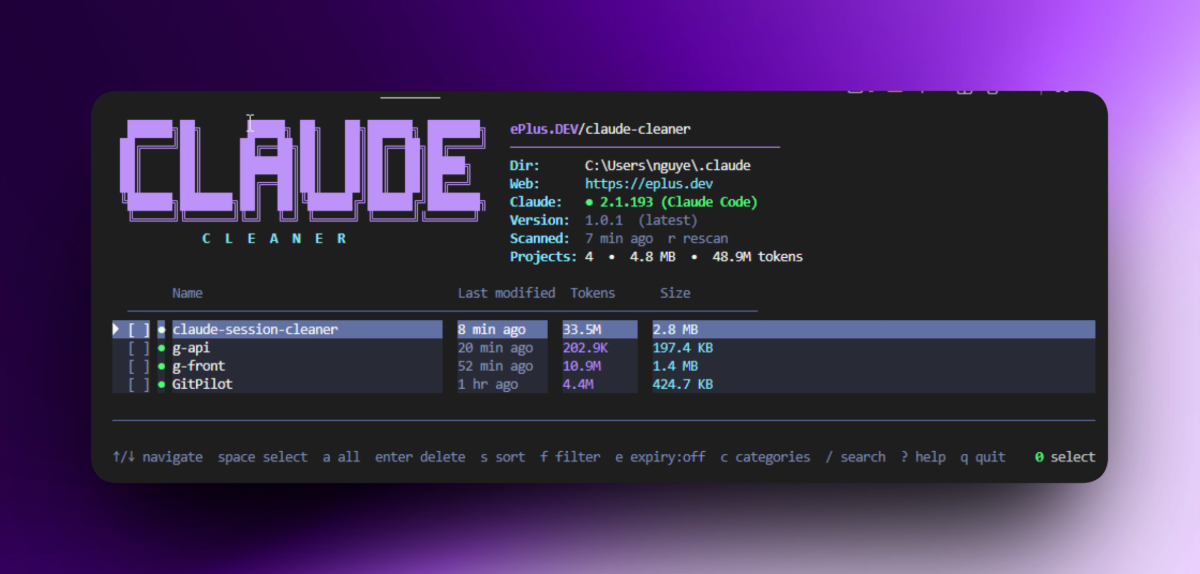
If you use Claude Code regularly across multiple projects, your local Claude data can gradually accumulate old sessions, conversation history, debug logs, and records for projects that may no longer even exist on your machine.
You can clean these files manually.
But manually deleting files inside .claude is not exactly the kind of maintenance task you want to get wrong.
That is why I built Claude Cleaner: an open-source terminal application that helps you inspect, manage, and safely clean Claude Code session data through an interactive TUI.
You can try it immediately:
npx claude-cleaner
No repository cloning. No Go installation required.

What Is Claude Cleaner?
Claude Cleaner is a cross-platform Terminal UI for managing local Claude Code session data.
It scans your Claude configuration and presents projects in an interactive interface where you can inspect things like:
Disk usage
Conversation count
Token usage
Last modified time
Projects with local session data
Projects that only exist in Claude metadata
Orphaned projects
Individual conversation sessions
Instead of deleting everything blindly, you can review exactly what is stored and choose what you want to remove.
Claude Cleaner currently runs on:
Windows
macOS
Linux
The application itself is written in Go, while the terminal interface is built with Bubble Tea and Lip Gloss.
Why I Built It
Claude Code stores project session history under:
~/.claude/projects
If you use Claude Code every day, especially across many repositories, this directory can slowly accumulate a significant amount of data.
Disk usage is only part of the problem.
Over time, you may end up with:
Sessions belonging to repositories you already deleted
Hundreds of old conversations
Projects you no longer recognize
Large session folders consuming unnecessary disk space
Old conversations that are difficult to review manually
Claude metadata referring to projects that are no longer available locally
You could simply open .claude and start deleting folders.
But I wanted a safer workflow:
Scan → Review → Select → Confirm → Delete
instead of:
rm -rf ~/.claude/...
That difference is basically the idea behind Claude Cleaner.
Run It with npx
The fastest way to use Claude Cleaner is:
npx claude-cleaner
If you prefer installing it globally:
npm install --global claude-cleaner
Then run:
claude-cleaner
The npm package is intentionally lightweight.
It acts as a wrapper that downloads the correct pre-built Claude Cleaner binary for your operating system and CPU architecture from GitHub Releases.
That means you do not need Go installed just to use the tool.
An Interactive TUI Instead of More Commands
When Claude Cleaner starts, it reads the project metadata available in:
~/.claude.json
and compares that information against the actual session data stored inside:
~/.claude/projects
Everything is then presented in an interactive terminal interface.
Some of the main keyboard controls include:
| Key | Action |
|---|---|
↑ / ↓ or j / k |
Navigate |
space |
Select or deselect an item |
a |
Select all visible items |
n |
Clear all selections |
o |
Select orphaned projects |
enter |
Open project details or delete selected sessions |
l |
Lock or unlock a project |
X |
Forget a project |
p |
Purge selected projects |
s |
Change sorting mode |
f |
Change filtering mode |
e |
Change expiry filter |
/ |
Search projects |
c |
Open category cleanup |
r |
Rescan |
? |
Show keyboard shortcuts |
q |
Quit |
For developers with a lot of Claude Code projects, this is significantly easier than manually inspecting directories.
See Token Usage Per Project
One feature I particularly wanted was visibility beyond simple disk usage.
Claude Cleaner can also display token usage per project.
When available, it reads Claude's lastTotal* usage fields from:
~/.claude.json
If those values are unavailable, Claude Cleaner can aggregate usage directly from the message.usage information stored in session .jsonl files.
Token totals are formatted into readable values such as:
125K
4.7M
1.2B
This means the project list can answer two different questions:
Which Claude project is consuming the most disk space?
and:
Which project have I used Claude Code with the most?
That can be surprisingly useful when Claude Code has become part of your daily development workflow.
Inspect Individual Conversations
You do not always want to delete an entire project's history.
Claude Cleaner includes a Project Detail view where individual conversation sessions can be inspected.
For each session, you can see information such as:
Modified time
Message count
Token usage
File size
You can then select individual .jsonl conversation files and remove only the sessions you no longer need.
This gives much finer control than deleting an entire project history directory.
Finding Orphaned Projects
A common scenario looks like this:
You clone a repository.
You work on it with Claude Code.
Later, you move or delete the repository.
The Claude session data may still remain.
Claude Cleaner can help identify these orphaned projects.
You can filter for them or use:
o
to select orphaned projects directly.
You still get a chance to review the selection before deleting anything.
Search, Sort, and Filter Large Project Lists
Once you have accumulated enough Claude Code projects, a flat list stops being useful.
Claude Cleaner therefore supports searching:
/
and multiple sorting modes:
recent
size
tokens
name
You can also filter projects by status:
all
has data
orphaned
There is also an expiry filter for older data:
7 days
14 days
30 days
60 days
90 days
For example, you can quickly narrow the list down to old Claude sessions that have not been touched for more than 30 days.
Protect Important Projects
Some project histories are more valuable than others.
You may have a large project where you want to preserve every Claude conversation, even when performing bulk cleanup.
Claude Cleaner supports protected projects.
Press:
l
to lock or unlock a project.
Locked projects are skipped by destructive bulk actions such as:
Select all
Orphan selection
Delete
Purge
Forget
This provides another layer of protection when cleaning large amounts of session data.
Delete, Forget, and Purge Are Different Operations
Claude Cleaner deliberately separates destructive actions into different levels.
Delete
A normal delete removes only the matching Claude session-history directory under:
~/.claude/projects
Your actual source repository is not touched.
Delete an Individual Conversation
Inside Project Detail, you can select specific conversation sessions and delete only those .jsonl files.
This is useful when you want to keep a project's history but remove some old conversations.
Forget Project
The Forget Project action removes:
Claude-owned session data
The matching project metadata from
~/.claude.json
It still does not delete your actual source code.
Purge
Purge integrates with Claude CLI when available and may run:
claude project purge
If the Claude CLI purge operation is unavailable, Claude Cleaner falls back to removing the corresponding session directory.
Dry Run Before You Delete Anything
For any cleanup tool, I consider a preview mode almost essential.
Claude Cleaner supports:
claude-cleaner --dry-run
In dry-run mode, you can preview which projects or categories would be removed without modifying any files.
If you are cleaning a large Claude installation for the first time, this is a good way to start.
Clean More Than Project Sessions
Claude Code can accumulate other disposable data besides conversation sessions.
Claude Cleaner includes a Category Cleanup screen for data such as:
Debug logs
Telemetry
History
Backups
Plugin cache
Plugin cache can be cleaned while preserving the actual plugin installation state.
This lets Claude Cleaner act as more than just a project-session remover.
Does Claude Cleaner Delete Your Source Code?
No.
This is one of the most important safety boundaries in the project.
Normal deletion operations only target Claude-owned session directories located directly under:
~/.claude/projects
Claude Cleaner validates deletion targets before removing them.
For example, your real repository might live at:
~/projects/my-awesome-app
That directory is not the cleanup target.
Even the Forget Project operation removes Claude session data and Claude metadata, not your actual repository.
Custom Claude Configuration Directories
Not everyone keeps Claude data in the default location.
Claude Cleaner supports custom Claude directories with the following priority:
--claude-dir
↓
CLAUDE_CONFIG_DIR
↓
~/.claude
On macOS or Linux:
export CLAUDE_CONFIG_DIR="/mnt/data/claude"
claude-cleaner
On Windows PowerShell:
$env:CLAUDE_CONFIG_DIR = "D:\ClaudeData"
claude-cleaner
You can also specify the directory directly:
claude-cleaner --claude-dir "/path/to/.claude"
Cross-Platform Native Binaries
Claude Cleaner provides pre-built binaries for:
Linux x64
Linux ARM64

macOS x64
macOS Apple Silicon

Windows x64
Windows ARM64
When installed through npm, the installer automatically downloads the correct binary for your platform.
If you prefer not to use npm, you can download a binary directly from GitHub Releases.
Go users can also install it with:
go install github.com/ePlus-DEV/claude-cleaner@latest
Why Use Go for a Tool Distributed Through npm?
At first, distributing a Go application through npm might sound unusual.
But there is a practical reason.
The actual application benefits from being a native Go binary:
Fast startup
Easy concurrency
No application runtime dependency
Straightforward cross-platform compilation
Small deployment surface
At the same time, many developers already have Node.js and npm available.
So npm becomes a convenient distribution mechanism:
npx claude-cleaner
The user gets the convenience of npm while the actual application remains a native executable.
A Small Tool for a Growing Claude Code Workflow
Claude Cleaner does not try to change how Claude Code works.
It solves a much smaller problem:
After weeks or months of using Claude Code, how can I understand what it has stored locally and safely remove the data I no longer need?
Instead of exploring hidden directories, opening JSONL files manually, and guessing which folders are safe to delete, the workflow becomes:
npx claude-cleaner
Then:
Review → Select → Clean
That's it.
Open Source
Claude Cleaner is open source and released under the MIT License.
npm
https://www.npmjs.com/package/claude-cleaner
GitHub
https://github.com/ePlus-DEV/claude-cleaner
You can try it right now:
npx claude-cleaner
If you use Claude Code regularly, take a look at your .claude directory.
You might be surprised by how many sessions have accumulated there.
Contributions, bug reports, ideas, and feature requests are welcome on GitHub.
About the author
A passionate full-stack developer from @ePlus.DEV
Comments
Join the discussionNo comments yet. Be the first to comment.
News
Stay informed with our News category. Get the latest updates on events, trends, business, technology, and more. Stay ahead in the modern world.